


Overview · Online booking & payments
A meal sponsorship calendar for Meals That Heal
Every day, volunteer groups (companies, schools, churches, clubs and families) sponsor and serve breakfast, lunch or dinner for the families staying at the House while their children are in the hospital. Each meal is a donation and a volunteer shift, and only one group can take each meal.
The House needed a way for groups to see which meals were open, claim one, and pay for it online. It also had to be simple for staff to manage, including the bookings that don’t fit the online process. We turned meal sponsorship into a self-serve online calendar, with secure payment and a back office the House staff can run themselves.
ClientRonald McDonald House Greater Fort Worth
ProgramMeals That Heal volunteer meal sponsorship
PlatformWordPress · WooCommerce · Stripe
DeliveredCalendar, booking, payments, staff tools
By the numbers
One meal, one group, every day of the year
700+
Meal slots managed across the calendar
155
Meals sponsored or reserved so far
3
Meal types, each with its own price, serving time and shift
1
Group per meal, enforced by the system
The challenge
What the House needed
For sponsors
- See at a glance which meals are open and which are taken, and by whom
- Book a specific breakfast, lunch or dinner in a few minutes
- Pay securely online and get an immediate confirmation and receipt
- Know the serving time, shift length and group-size rules up front
For House staff
- Control which days and meals the public can book
- Enter bookings by hand, including groups that pay by check
- Find any booking quickly, and cancel or move it cleanly
- Report on meals served and export the data
- Edit pricing, times and email wording without a developer
The solution
What we built
We built a custom booking system inside the House’s existing WordPress site. Every meal is a record in WordPress. WooCommerce and Stripe only handle the payment, so the calendar stays the single source of truth for who is serving when.
1 · Public calendar
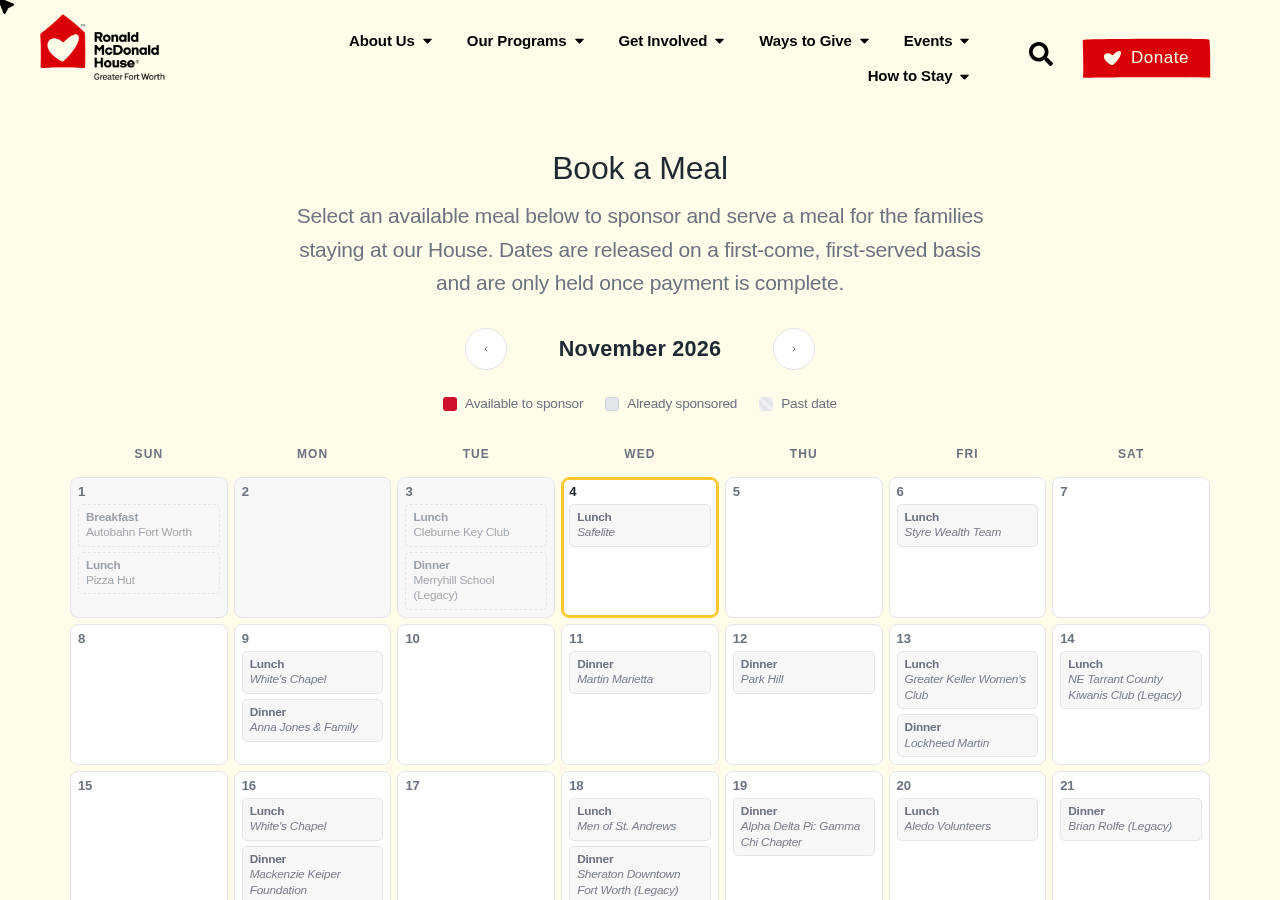
A month-by-month calendar shows every breakfast, lunch and dinner as available, sponsored (with the group’s name) or past. Breakfast runs on weekends only, and staff choose which days of the week are open to the public.
2 · Booking form
Clicking an open meal opens a form showing the date, serving time, time commitment and donation amount. It collects contact and group details, group size within the House’s limits, the 16+ age confirmation, and any special occasion the group is serving for.
3 · Secure checkout
When the form is submitted, the meal is held for that group for 20 minutes while they pay through Stripe. When payment completes, the meal is marked sponsored and confirmation emails go to the group and to staff. If they don’t finish paying, the meal goes back on the calendar by itself.
4 · Staff back office
Staff get a dedicated Meal Slots area in WordPress with settings, bulk tools, search, filters, private notes, reminder emails, automatic scheduling, and a Reports & Export screen.
Problems & solutions
What came up along the way, and how we handled it
The project grew alongside the House’s day-to-day use of it. These are the real problems we solved together.
Two groups could try to book the same meal at the same moment.
Solution
The system claims each meal in a single database step, so only one submission can win and the other is told right away, before anyone pays. A meal being paid for is held for 20 minutes (staff can change this) and released automatically if checkout is abandoned.
The calendar needed to go live before the payment account was ready.
Solution
A “coming soon” mode. Visitors could browse every date and see a friendly message instead of the payment form, while administrators could still run real test bookings. Going live was a single checkbox.
Not every meal or day should be bookable online.
Solution
Staff choose which weekdays appear publicly and can block individual meals in bulk. Hidden days still exist in the back office and can be booked by staff, but the public can’t reach them, even with an old link.
A meal that was already booked showed as open.
Solution
We traced it to an empty duplicate record for the same date and meal and removed it. Then we made sure it can’t happen again: the editor now refuses to save a second breakfast, lunch or dinner on a date that already has one.
The standard WordPress admin screens weren’t built for managing bookings.
Solution
Purpose-built staff tools: search across contact names, emails, phone numbers, dates, order numbers and private notes; filters by month, upcoming/past and status; one-click bulk Block/Unblock; editable contact details on every booking; and a “Cancel booking & release date” button that logs who cancelled and what the booking was.
Staff had to keep creating future dates by hand.
Solution
New months are generated automatically, seven months ahead by default, following the House’s meal pattern. Existing dates are never duplicated or changed.
Leadership needed numbers, and groups needed reminders.
Solution
A Reports & Export screen with monthly meal counts and spreadsheet-ready CSV downloads. Optional day-before reminder emails go to each booked group, with a copy to staff if they want one.
Some groups pay by check, and marking them “on hold” left their date open to others.
Solution
“On hold” is the system’s own 20-minute checkout hold, so a hold set by hand looked expired and the date reopened. We added a dedicated Awaiting payment status. Those meals show as taken on the calendar, can’t be booked online, and are highlighted in the staff list until the check arrives.
Staff couldn’t edit the confirmation email, and amounts displayed incorrectly.
Solution
Every email the system sends (payment confirmation and receipt, manual confirmation, reminder) is now editable under Emails & Automation. Placeholders such as the group name, date, amount paid and order number fill in automatically, and a test button sends a sample. We also fixed the formatting bug so amounts read “$450.00”.
The CFO asked whether sponsors could cover card processing fees.
Solution
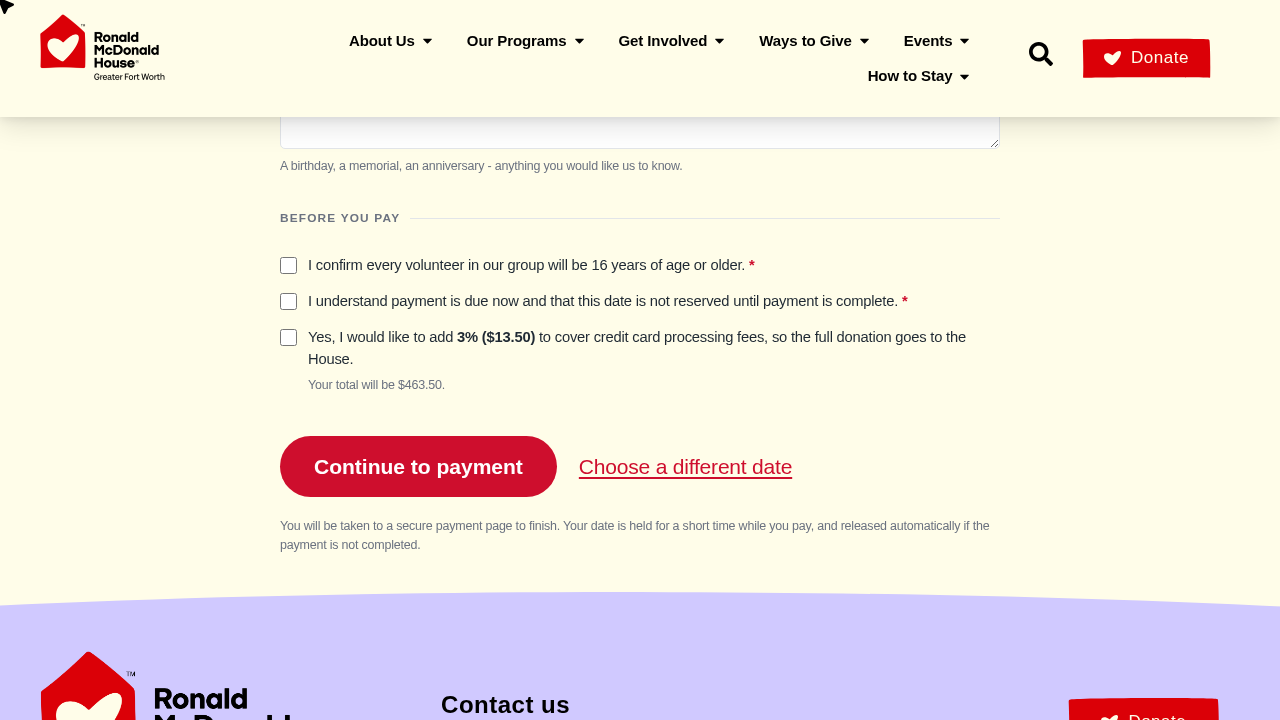
An optional, unticked checkbox at checkout shows the exact amount (for example, “add 3% ($13.50)” and the new total). The fee goes on the order as its own line, so the meal donation and the reports stay accurate. Staff can turn it off or change the percentage in Settings.
Timeline
How the project evolved
September 2026Calendar, booking form, Stripe checkout and core settings launched behind the coming-soon switch. Meal slots generated from September onward.
October 2026Duplicate-meal safeguard added. Staff tools added: search, filters, bulk actions, contact editing, reminder emails, automatic scheduling, and Reports & Export.
Late October 2026“Awaiting payment” status added for check-paying groups. Cancel-and-release workflow refined.
November 2026Editable payment confirmation email, dollar-sign fix, and optional processing-fee coverage at checkout.
Under the hood
Built to last
Lives inside the site the House already has. No third-party booking subscription and no separate login for staff. Everything is managed from the WordPress dashboard.
Separate parts, so one problem can’t break the rest. The calendar, booking and payment, public data, and staff tools are separate pieces. If the staff tools ever had a problem, the public calendar would keep working.
Staff stay in control. Prices, serving times, group-size limits, hold time, bookable days, email wording, reminders and the processing-fee option are all settings, not code.
Safe by design. One group per meal is enforced by the database, abandoned checkouts release themselves, and hidden or blocked dates can’t be booked through an old link.
The result
More meals served, less admin
Ronald McDonald House Greater Fort Worth now has a booking system that sponsors can use on their own and staff can run themselves. Groups find an open meal, book it and pay in minutes, and every sponsor’s name appears on the calendar. Staff get their time back for the families. As the House’s needs changed, the system changed with them.
“Anthony and his entire team are true professionals. Amplus helps the Ronald McDonald House of Fort Worth achieve its mission goals through the creation of compelling videos, digital advertising and website modifications. The team also provides knowledge and resources to the in-house RMHFW team. I would highly recommend Amplus for any of your digital marketing or video needs.”
Beth Lamb, CMO, Ronald McDonald House of Fort Worth
Also for the House · Video production
Making the Community Care
Every year, the Ronald McDonald House hosts a charity banquet. As part of their presentation, they want to show how they’ve impacted the lives of those in the community and created success stories.
For the past 5 years, we have been their agency of choice for creating their charity videos. Each year we take a new angle, find families at different points in their journey, and give them a safe, unhurried space to tell their story.
